Try the demo version of the Evocommerce CMS online store management system



Evocommerce Demo — More Than Just a Preview: Try Your Future Online Store
When a company commissions a new online store from a web development agency, it often sees only a technical specification, a prototype, individual design mockups, or a presentation of what is planned for development. The finished result appears much later. At Evocommerce, we have built the process differently.
After registering in the customer account, the client provides information about their business, industry, product range, and the objectives of the future store. Based on this information, a ready-to-use online store environment can be created, complete with a CMS, frontend, and the necessary functionality. In other words, getting to know the product does not begin with a promise of what it might become someday, but with the opportunity to see it and try it in action.
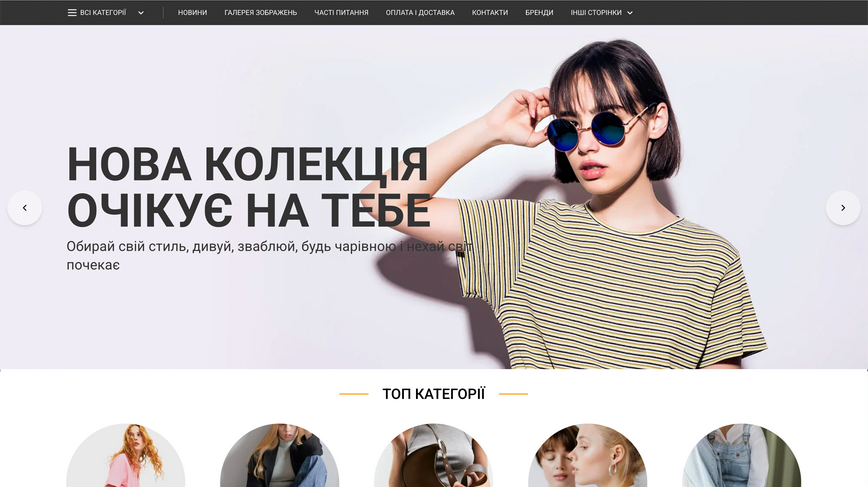
That is exactly what the Evocommerce demo is designed for. You can open an online store and experience it from a customer's perspective, then log in to the administration system and explore the same business from the perspective of an owner, administrator, marketer, or manager.
The EvoCommerce Platform demo is useful for companies planning to upgrade their online store, switch to a modern CMS, or reduce their dependence on SaaS platforms and marketplaces by building their own online store on an advanced technology platform.
Try a B2C Store as If It Were Already Yours
In demo mode, you can evaluate more than just an attractive homepage. You get the opportunity to understand how the store will work in real-world conditions.
You can explore the catalog, categories, product pages, search, shopping cart, and checkout process. Then you can move on to appearance settings: change the page structure, rearrange content blocks, choose different content types, and work with banners, menus, and other elements.
This makes it easier to understand what your own future B2C online store for retail sales could look like, rather than simply viewing someone else's demo website.
You can experiment with the homepage structure, change how products are displayed, select different block layouts, and see how the store will look to customers. This is important for any business: even before launch, you can evaluate how effectively products are presented and how easily customers can move from their first visit to placing an order.
From B2C to Your Own B2B Portal
The modular architecture of Evocommerce allows you to significantly extend a basic store through apps and reduce the cost of creating an online store.
For example, a company may start with a retail B2C store while also working with dealers, partners, or wholesale buyers. In this case, B2B functionality can be added to the system. With a set of specialized apps, a standard online store can be transformed into a B2B portal for wholesale sales.
This adds personalized customer terms, buyer groups, different pricing types, restricted access to specific information, special offers, and other tools required for wholesale operations.
That is why the Evocommerce demo is useful not only for companies looking for a new retail online store. It allows you to evaluate the foundation on which a much more sophisticated online sales system can be built.
A Fully Functional Online Store CMS Demo
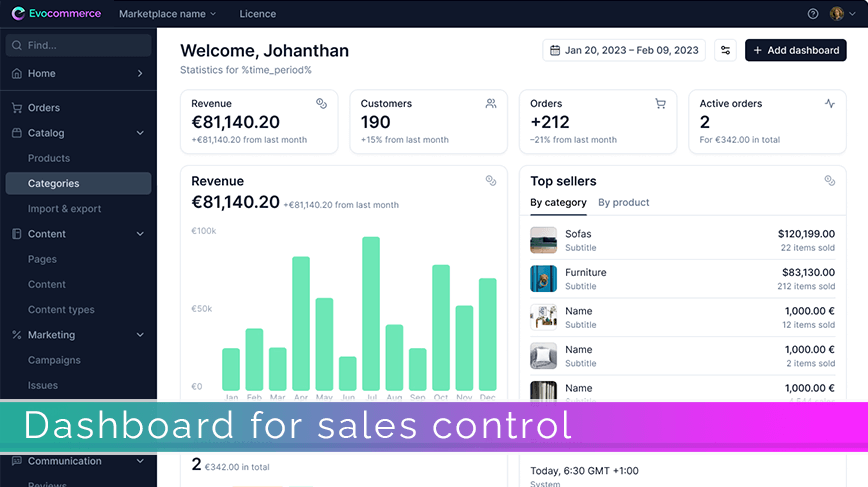
One of the most important parts of the demonstration is the opportunity to explore Evocommerce CMS.
The store's frontend and administration system already work together. You can change information in the CMS and see how it is reflected in your online store.
You can start with the Dashboard, which brings together the key information about the system's operation. From there, you can move on to the catalog, categories, and products.
We especially recommend trying the product management page. Our goal was to make it possible for managers to edit a product without having to navigate through dozens of different sections.
You can manage the product name and description, attributes, images, videos, prices, stock levels, availability, dimensions, variations, and other parameters all on one page. You can change the order of product images, add different pictures, work with multiple price types, view the product's association with promotions, and add internal notes.
These are the tasks an online store team handles every day. That is why, when choosing a CMS, it is important not only to read a list of its features but also to try adding a product, changing a price, editing a category, or finding a specific order yourself at least once.
See How Your Team Will Work
In demo mode, you can explore order management and see how easily a manager can work with a customer after a purchase has been placed.
Order details, status, products, customer information, payment, delivery, comments, internal notes, and activity history — all of this must be easy to understand for someone who processes dozens or hundreds of inquiries every day.
You can also try working with content, configure languages, catalog structure, product classification, users, and other store settings. Essentially, the demo gives you a small test drive of your future online business.
Add Features Through Evocommerce Apps
Not every business needs the same set of features. One company may need a specific delivery service, another a particular payment system, CRM, analytics, a marketing tool, or a specialized B2B feature.
That is why Evocommerce is developed as a modular platform. You can add the features you need through Evocommerce Apps, gradually building a configuration tailored to your business.
This is especially convenient in the demo: you can do more than simply read about a particular feature — you can understand why your company might need it. This helps you avoid paying for unnecessary functionality while ensuring you do not overlook tools that could automate workflows or help increase sales.
Try It First — Then Make Your Decision
We believe it is important for customers to understand exactly what they are buying.
You can explore the design, CMS, catalog, products, orders, and apps, put together the set of features you need, and see what your future system will look like. After that, it becomes much easier to define the project configuration and its cost.
This is one of the key differences between the Evocommerce approach and traditional custom online store development from scratch. You do not have to imagine the product based solely on a technical specification. You can try the online store demo and explore the CMS features and capabilities, see the ready-made technology foundation, and only then decide what needs to be changed or added for your business.
Your future store can be adapted for retail or wholesale operations, a large product catalog, multiple languages, advertising campaigns, and further scaling. Once the configuration is clear, you can move from the demo to launching your own B2C store or B2B portal.
The Evocommerce demo gives you the opportunity to explore the product from the inside before purchasing, try managing it, configure it to your needs, and understand exactly how an online store can work for your business.