
Category list
Category list
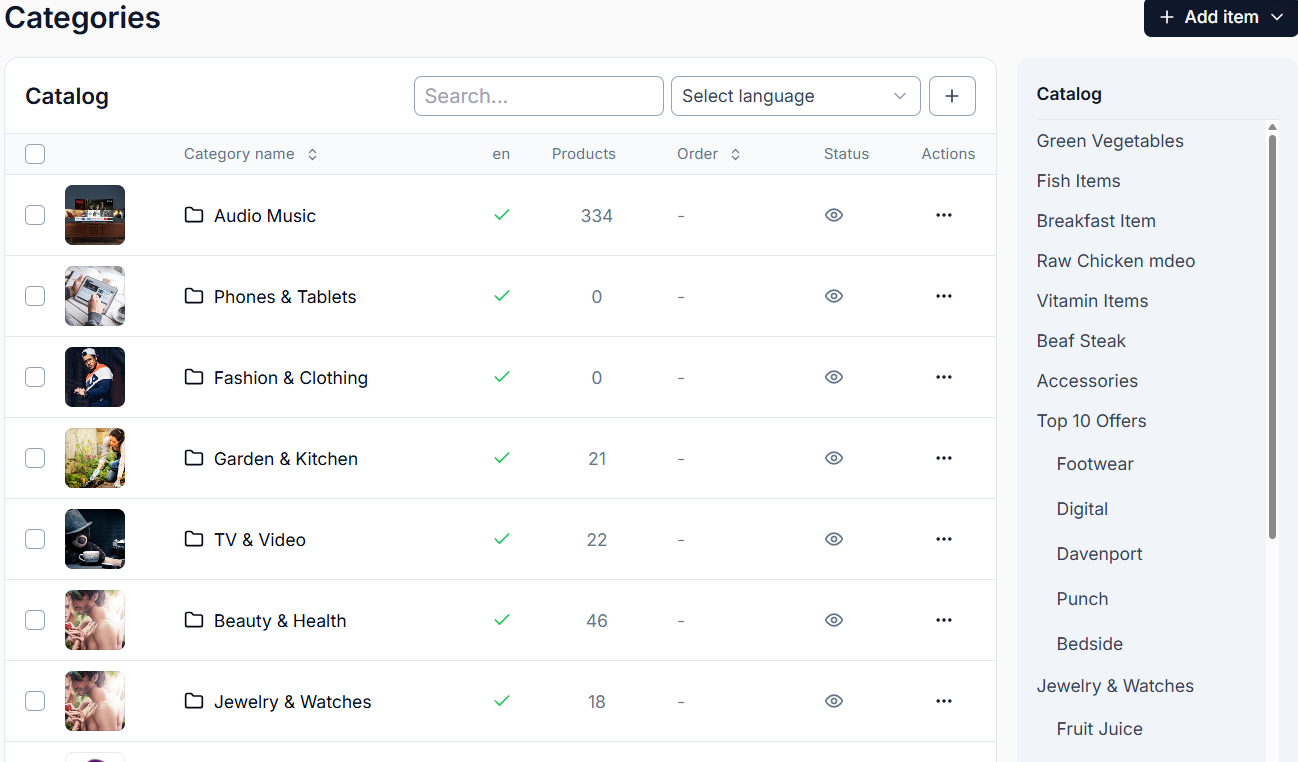
The Categories page is the main tool for managing the structure of the product catalog. It allows you to create, edit, organize, and view product categories and subcategories.
On the right, the + Add item / Add category button opens the page for creating a new category or subcategory.
Main Categories Table
The central section contains a table listing all available categories.
Each row in the table represents an individual category and contains the following fields:
Field | Description |
Checkbox | Used to select categories for bulk actions. |
Image | Category thumbnail (optional). |
Category name | Name with multilingual support. |
Language indicators en, uk | Indicate whether a translation of the category name is available for each language. |
Products | Number of products assigned to the category. |
Order | Sorting order number (for manual arrangement). |
Status | Visibility status: |
It also includes the following controls:

— the category is active

— a dropdown menu with actions: edit and delete
Search and Filtering Panel
A control panel is located above the table:
Search — allows you to search by category name.
Select language — filters categories based on the availability of a translation in a specific language.
Category Tree Sidebar
On the right, the Sidebar displays the category hierarchy as a tree:
Root categories are displayed at the top
Subcategories are displayed in a nested structure
Each category name is clickable and opens the category for editing
At the bottom, there is a + Add category button
Bulk Actions
By using the checkboxes, the administrator can:
Delete multiple categories at once
Change the sorting order (optional)
Additional Features
Multilingual support: the system tracks the availability of translations
Ability to add images to categories
The hierarchical structure allows you to create nested categories with unlimited depth
Integration with the product module: the number of products in each category is displayed automatically
When deleting a category, you can move the products assigned to it.
Recommendation: Avoid duplicating category names within the same level of the hierarchy. This will improve navigation and SEO.