
List of groups
List of groups
Product Groups
The Product Groups section is designed to organize products into additional logical groups based on their properties, purpose, popularity, seasonality, or marketing objectives. Groups make it possible to organize products independently of the main catalog structure and use them to create themed collections, special offers, and convenient navigation within an online store.
Unlike categories, which define a product's primary place in the catalog, groups provide an additional classification method. A product can belong to several groups simultaneously while remaining assigned to only one category. For example, a product can be included in the "New Arrivals", "Best Sellers", and "Recommended Products" groups without changing its primary category.
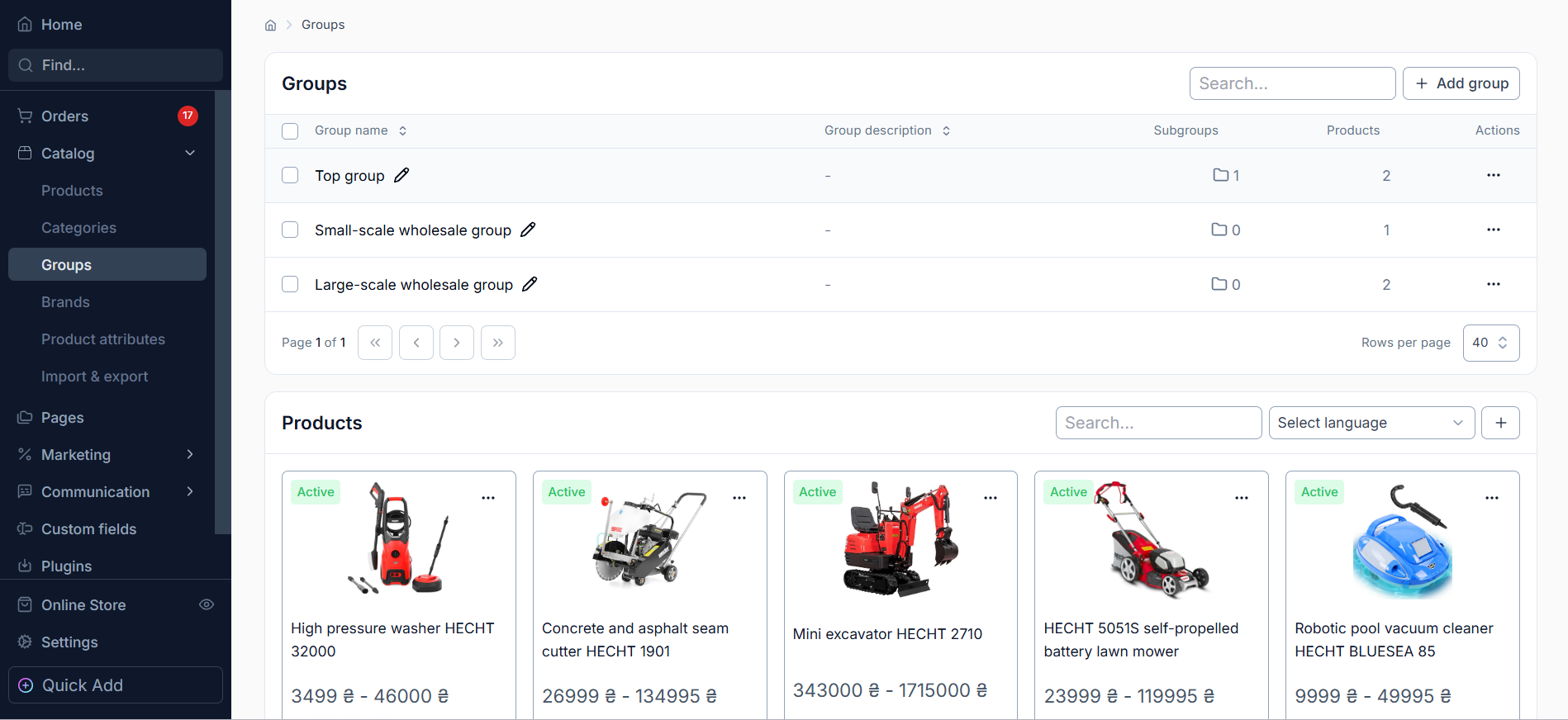
Key Features
1. Product Groups List
This section displays a list of created groups with general information:
Name – the group name used to identify it and display it in the administrative interface.
Number of Subgroups – the number of child groups, if a multi-level structure is used.
Number of Products – the total number of products assigned to the corresponding group.
This structure makes it possible to quickly assess group contents and monitor product organization.
2. Creating and Editing Groups
The CMS allows you to create new product groups and edit existing ones. During configuration, you can specify the group name, its position in the structure, and other available settings. If necessary, groups can be organized into a nested structure with subgroups.
3. Managing Products in a Group
Each group provides the ability to view and manage the list of products assigned to it. This allows you to add the required products to a group or modify its contents according to the store's current needs. The same product can belong to an unlimited number of different groups, providing flexibility when creating product collections.
4. Searching for Groups
The built-in search allows you to quickly find the required groups by name. This is especially convenient for stores with a large product assortment and a significant number of created product groups.
Differences Between Groups and Categories
Groups and categories serve different purposes in catalog organization:
Category defines the product's primary place in the catalog structure. A product can belong to only one category.
Group is used to additionally organize products according to specific attributes or business objectives. A product can belong to several groups simultaneously.
SEO Settings are available for categories but are not used for product groups. Groups are not intended for creating separate SEO catalog pages.
Usage Recommendations
It is recommended to use groups to create themed collections such as "New Arrivals", "Popular Products", "Special Offers", "Recommended Products", "Seasonal Offers", and others.
This approach allows you to manage your product assortment flexibly, reuse products in different collections, and implement marketing scenarios without changing the main catalog category structure.